








Choosing a modular HRIS isn’t about piling on features until the product spec sheet is completely filled. The point is actually the opposite: selecting the building blocks the company truly needs, activating them at the right time, and maintaining an architecture that can evolve.
For a mid-sized company, the task is more challenging than it seems. Multiple subsidiaries, multiple locations, sometimes differing HR practices, and a heterogeneous technical infrastructure: the right HRIS isn’t the one that promises the most. It’s the one that absorbs this complexity without creating new complexity.
A modular HRIS is based on a simple principle: the company isn’t required to deploy the entire HR suite all at once. It chooses the features it needs and then gradually expands its system. We won’t redefine the entire scope of an HRIS software. Rather, the goal is to understand what modularity actually changes.
A company can start by centralizing employee records and managing time off, then later expand to include performance reviews, training, and recruitment or compensation. This approach reflects a fairly simple reality: not all companies have the same priorities or the same level of HR maturity at any given time.
A mid-sized company moving away from Excel spreadsheets will often be best served by securing its master data first. Another company, already equipped for HR administration, may have a much more pressing need for performance reviews or training. Modularity therefore helps avoid two pitfalls:
This is a distinction that should always be verified during a request for proposals. A solution may be technically modular, consisting of separate components, but marketed as packages. Conversely, some vendors actually allow each module to be activated and billed separately.
Before comparing offers, ask yourself this very simple question: Can I purchase only the modules I need today, and then add more without having to revise my entire contract or architecture? This is often where you find out whether the advertised modularity actually works in practice.
There is no such thing as an ideal architecture in the absolute sense. The right model depends primarily on the existing infrastructure, the maturity of the organization, and its ability to manage multiple tools.
| Model | Benefits | Points to watch out for | Suitable profile |
| Modular HRIS | Phased deployment, adjustable scope, data continuity across modules | Cumulative costs to monitor; the need to maintain a consistent user experience | Well-structured small and medium-sized businesses and mid-sized companies that want to move forward in stages |
| All-in-One Suite | Extensive coverage from the start, a unified environment, and a limited number of interfaces | A more complex project, features that are sometimes over-engineered, and significant change management | Organizations that are already well-established with a clearly defined scope |
| Best-of-breed | Selecting the best specialist for each process; functional depth | An increasing number of interfaces, data that is more difficult to consolidate, and more complex administration | Organizations with an IT department or strong integration capabilities |
The main advantage of a modular model is also its main pitfall. Because it's easy to add a building block, you can end up accumulating too many of them.
After a few years, the company must then verify that its architecture remains truly simpler, more consistent, and more cost-effective than a broader suite.
So the right question isn't, "Is a modular architecture better?" It's, " Which architecture will you still be able to manage properly three years from now?"
A mid-sized company is not simply an SME with more employees. In 2023, INSEE identified 7,442 mid-sized companies in the market sector under study, accounting for more than 4.1 million full-time equivalent jobs.¹
This category often includes organizations composed of multiple legal entities, facilities, or locations. It is this organizational complexity—rather than headcount alone—that influences the process of selecting an HRIS.
Let’s consider the case of a group consisting of several companies. Teams need to consolidate data on a global scale while maintaining the rights, rules, or approval workflows specific to each entity. Absence management is a good example of this issue.
A policy may depend on a specific employee group or a collective bargaining agreement, yet the HR department must still produce consolidated reports. CFBL, for example, has 300 employees spread across five companies. During its HRIS project, the ability to incorporate the specific provisions of its collective bargaining agreement into absence management and to integrate with its Silae payroll software was one of the selection criteria.²
This type of requirement must be tested in a demonstration, not simply checked off on a "multi-entity: yes/no" checklist.
In an organization spread across multiple sites, centralization does not necessarily mean imposing exactly the same operating procedures everywhere. The real challenge often lies in deciding what should be standardized and what can remain local: guidelines, approval processes, managerial roles, reporting, and the timing of certain campaigns.
At Charier, the transformation involved 20 branches and 40 HR employees. The rollout brought the teams together on a common foundation and established standardized processes.³
Software matters, but organizational decisions come first: Which differences between entities are legitimate, and which are merely the legacy of historical practices?
It’s rare for a mid-sized company to start from scratch. Instead, they typically have payroll software, a few Excel files that have become essential, an outdated ERP system, Word forms, and sometimes in-house tools. The new HRIS must incorporate this history without replicating its disorganization.
The Cofimé Group, which has 250 employees across 10 locations, used to manage several processes using internal tools, shared servers, and Excel files before centralizing its HR data.⁴
Data migration is therefore not just a technical step to be completed two weeks before the switchover. It is a project in its own right: sorting, cleaning, resolving discrepancies, identifying the reference data, and deciding what data is actually worth migrating.
A mid-sized company may have a complex organizational structure without a dedicated IT team available for twelve months to work on the HR project. This changes the selection criteria. The level of autonomy granted to HR administrators, the ease of configuration, the quality of support, and managers’ ability to quickly get up to speed with the tool become key factors.
An HRIS that is extremely powerful but cannot be upgraded without external assistance may be perfectly suited for a large corporation but much less so for a mid-sized company that wants to maintain its autonomy.
Modularity really comes in handy when each building block addresses a specific problem.
| Module | What he manages | Key Benefit | Frequent priority |
| HR file | Employee Data, Documents, Administration | Create an HR reference record | Foundation |
| Absence Management | Vacation, Absences, Approval | Streamlining a daily process shared by everyone | Foundation |
| Recruitment | Job Postings, Applications, and Application Status | Organizing and Sharing Recruitment Information | As needed |
| Onboarding | Pre-boarding, onboarding, documents, steps | Ensuring a Smooth Onboarding Process for New Employees | By volume |
| Interviews and Careers | Interviews, Goals, Skills, Career Paths | Ensuring continuity in employee development | Talents |
| Training | Needs, plans, budgets, monitoring | Leading Skills Development | Talents |
| e-Learning | Online Content and Courses | Expand the training program to a larger scale | Development |
| Remuneration | Increase campaigns, budgets, history | Structuring Pay Decisions | Management |
| Commitment | Surveys and Perception Measurement | Identify Collective Trends | Management |
| Payroll preparation | Variables, Controls, Transmission | Ensuring the Accuracy of Data Sent to Payroll | Foundation / based on existing conditions |
This table does not constitute a universal deployment order. A company that is hiring on a large scale may need to prioritize recruitment over training. Another company may face a regulatory or operational emergency regarding interviews and career paths. Modularity is specifically designed to avoid imposing the same sequence on everyone.
A simple path can serve as a starting point for framing.
Start with the processes that improve data reliability and deliver quickly visible benefits. The HR system is generally foundational, as it provides the reference data for other processes.
The absence management can also be a good place to start: it directly involves employees and managers and allows you to quickly gauge adoption.
Once the foundation is stable, the company can integrate additional processes—such as performance reviews, skills management, training, onboarding, or recruitment—based on its priorities. It is at this stage that the value of the integrated system becomes more apparent.
For example, a need identified during an interview can contribute to skill development rather than remaining confined to a report.
Compensation, engagement, e-learning, or consolidated dashboards can then be added to the system once the data and practices are sufficiently robust.
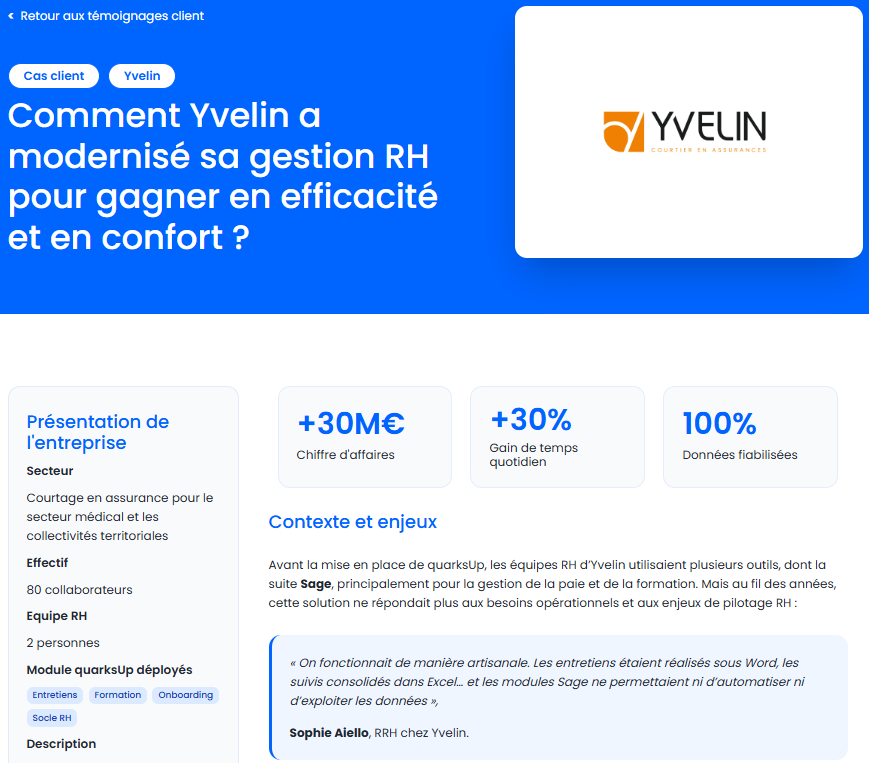
This sequence is a method, not a rule. Yvelin provides a good counterexample: the company started with interviews, then rolled out training, and only later added the HR file and onboarding.⁵ Its main initial challenge was, in fact, the interviews.
This is a good lesson for any modular project: start with the problem that really needs to be solved, not with the first module listed in the catalog.
A proof becomes much more useful when each criterion is turned into a specific question.
| Criterion | Why He Matters | Question for the Editor |
| 1. Multi-entity | Consolidate without losing local characteristics | Is it possible to manage multiple companies and locations within the same environment? |
| 2. True modularity | Avoid Required Modules | Can I activate and bill for the modules gradually? |
| 3. Payroll Interoperability | Minimize re-entry | What integration options are available with our payroll solution? |
| 4. Flexibility in configuration | Reduce Dependence on the Publisher | What can we change ourselves after deployment? |
| 5. User Experience | Promote adoption | How many steps must a manager take to approve a routine request? |
| 6. Data Recovery | Starting Off on the Right Foot | Who cleans, checks, and validates the data before migration? |
| 7. Multi-entity reporting | Group-wide management | Can we consolidate the data and then drill down by company, site, or population? |
| 8. Security and Hosting | Protecting HR Data | Where is the data stored, and how are access rights managed? |
| 9. Scalability | Avoid having to change tools again in the medium term | What happens if we double our workforce or add new entities? |
| 10. Support | Ensure a Secure Deployment | Who is leading the project, and who will support us once the tool is launched? |
The functional matrix remains useful, but it should not become a collection of green boxes. Two solutions may claim to offer the same “multi-entity” functionality while providing very different levels of depth. That is why a good set of specifications first describes the situations to be resolved, before specifying the required features.
Comparing only the price per user or per month provides a very incomplete picture of the project.
The total cost, or TCO, is made up of several components:
Internal time is part of that. Six workshops with several managers, weeks spent cleaning up Excel files, or manually re-entering historical data aren’t always included in the vendor’s quote. Yet they come with a very real cost.
The same logic applies to interfaces. An attractive price for the software loses its appeal if the company then has to pay for custom development to enable data to flow between its HRIS and its payroll system.
A good business case, therefore, does not simply compare subscription plans. It quantifies, as much as possible, the cost of the target operation and the cost of maintaining the current system.
Modularity means you don’t have to buy everything up front. It does not guarantee that the solution will always be less expensive. As you add modules, their cumulative cost may approach—or even exceed—that of a competing packaged offering.
So when negotiating, don't just ask, "How much does our configuration cost today?"
Also ask, “What will our cost be once we’ve activated the six or seven building blocks outlined in our roadmap?” That way, you’ll be comparing target architectures rather than entry-level prices.
An HRIS project doesn't always go off the rails with a bang. It can also be delivered on time, only to remain underutilized six months later.
| Cause | Warning Signal | Parade |
| 1. An initial wave that was too broad | All topics become "priorities" | Narrow Wave 1 down to a few clearly identified irritants |
| 2. An Underestimated Data Recovery Effort | Duplicates, conflicting fields, no data owner | Clean and resolve conflicts before migration |
| 3. No internal point of contact | Each question is forwarded to the publisher | Appoint an HRIS manager who has the necessary time and authority |
| 4. Managers are introduced to the tool at launch | Low participation in workshops and tests | Involve a few key managers early on |
| 5. Usage is never measured | The project ends at "go live" | Track connections, process completion, timelines, and issues after launch |
The Charier case is a good example of the third point: the company hired an in-house HRIS administrator to support the rollout of the suite across its 20 branches.³
The HRIS administrator is not merely a technical administrator. He or she often serves as the link between HR policies, the system, and actual usage.
A method of choice is valuable only if it also allows us to conclude that a solution does not necessarily apply to all contexts.
quarksUp positions itself as a modular HRIS for small and medium-sized businesses. Public customer testimonials highlight its use in multi-site or multi-company organizations seeking to centralize their data and standardize previously disparate processes.
CFBL uses several modules in an environment consisting of five companies.²
Cofimé has centralized its HR operations across 10 locations.⁴
Charier has standardized its management across 20 branches.³
Above all, these examples provide a useful reference point: modularity makes sense when a company wants to build a shared environment without having to transform everything all at once.
No HRIS should be selected simply because it fits a particular category of company. If your requirements specification calls for, for example, a fully native payroll system within the same environment, highly advanced functional localization in numerous countries, a specific enterprise-wide automation system, or highly advanced BI capabilities, these requirements must be explicitly tested before selecting a solution.
The best approach is to go back to your requirements specification and compare several architectural designs.
The comparison of the best HRIS software can help expand this initial shortlist. The goal isn’t to force your organization to fit into a tool. It’s to choose a tool that can adapt to your organization.
It allows the scope of operations to evolve in line with the company's priorities. A mid-sized company can start with a few core processes and then add other building blocks without immediately committing the entire organization to a comprehensive transformation.
There is no such thing as an ideal number. The right scope is the one that teams can actually deploy, support, and adopt. Two modules used effectively are better than six modules running simultaneously but ill-suited to the task.
HR systems and absenteeism often provide a solid foundation, but the process must begin with the company’s pain points. If interviews or recruitment are currently the main sources of friction, they can certainly be the first areas to address.
A modular HRIS brings together several components within the same environment, sharing a common data and user experience framework. A best-of-breed approach combines several specialized software solutions, each selected independently for a specific process. It offers greater flexibility but generally requires more integration and IT governance.
Compare the total cost based on the target scope: licenses, deployment, migration, interfaces, training, internal project time, and administration. Also request a cost estimate based on the modules you plan to activate in the medium term, not just the initial scope.
By involving users before launch, limiting the initial scope, choosing processes that quickly deliver visible benefits, and monitoring usage after the system goes live. Change management begins before the final training session.
Yes, provided that the multi-entity management capabilities are robust enough for your organization. You need to test access rights, workflows, local rules, shared repositories, and the ability to generate consolidated reports. Simply having a “multi-company” feature listed in a brochure is not enough.
A modular HRIS is valuable when it allows a company to move forward gradually without losing overall consistency. For a mid-sized company, it is precisely this balance that matters: harmonizing what needs to be harmonized, preserving useful specific features, and having a system capable of evolving with the organization.
Would you like to compare your HR roadmap with what quarksUp has to offer?
1. INSEE, “The French Business Landscape by Company Category in 2023,” INSEE Focus No. 372, December 10, 2025. Data on the number of medium-sized companies (ETIs) and their workforce in France.
View the INSEE study
2. quarksUp, CFBL case study, “Improve the reliability of HR management and save time with quarksUp.” Overview of the organization, its 5 companies, 300 employees, and the criteria for interoperability and collective bargaining agreement management.
View the CFBL case study
3. quarksUp, Charier case study, “From 1 month to a few minutes: How Charier Transformed Its HR Management.” Data on the rollout across 20 branches, the HR team, and the project organization.
View the Charier case study
4. quarksUp, Cofimé Group case study, “The Cofimé Group Streamlines and Centralizes Its HR Management with quarksUp.” Data on the 250 employees, 10 locations, and HR organization prior to the project.
View the Cofimé case study
5. quarksUp, Yvelin case study, “How Yvelin Modernized Its HR Management to Improve Efficiency and User Experience.” Overview of the phased rollout of the Interviews, Training, HR Records, and Onboarding modules.
View the Yvelin case study